IOS Device Security

  • Standard Access-lists
    • Matches on source IP address only
  • Extended Access-lists
    • match on ip protocol #
    • Source and destination address
    • protocol options
      • tcp/udp ports
      • icmp type code
      • tcp state (established keyword)
    • Packet markings
      • DSCP/IPP
    • Non-initial fragments (fragments keyword)
  • Access-list Logging
    • Log can be generated on match.
      • Log vs. log-input
      • generated as syslog level ‘informational’
      • Causes packets to be process switched.
    • Logging rate-limiting
      • ‘ip access-list logging interval
      • ‘ip access-list log-update threshold’
      • ‘logging rate-limit’
    • ACL Syslog Correlation Tags
      • ‘log [cookie]’
      • ‘ip access-list logging hash-generation’
  • Applying IPv4 ACL
    • Traffic Filtering
      • ‘ip access-group’
    • Traffic Classification
      • ‘match access-group’
    • Route Filtering
      • ‘distribute-list or route-map’
    • VTY line/username access-control
      • ‘access-class in/out’

Topology Subnets:

R1: 172.16.1.0/24
SW4: 192.168.1.0/24
SW2/3/1: 10.30.1.0/24

Access-list Examples:

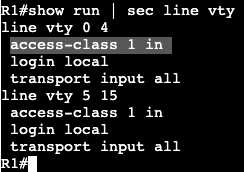
  • On R1 we’ll permit who is allowed to telnet/SSH to the box.
Access-list for host SW2

We’re creating an access list and associating it to the VTY lines with ‘access-class’. Can connect successfully from R2, but when trying from R3 I get the following message:

  • Now we can get more specific with an extended ACL:
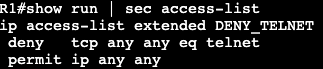
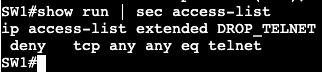
The above will be applied to the interface instead of the VTY lines denying only port 23 from anybody.

A ‘show access-list’ will confirm the matches of the ACL.
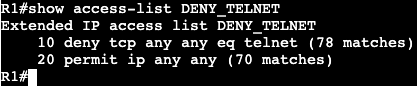
Time Based ACL:

  • Used to activate ACL entry based on clock
  • Defined as time-range <name>
    • Absolute
      • one specific time
    • Periodic
      • One or more recurring times.
  • Potential Applications:
    • Time based traffic filter
    • Time based QoS
  • Above is an example of a time based ACL. If the IOS device clock shows between 09:00 and 17:00, then telnet will not be available inbound on the Gig0/0 interface of R1.

Unicast Reverse Path Forwarding:

  • Used to simplify Bogon/martian filters
    • Addresses that are invalid on the internet.
  • Ingress traffic has source checked against CEF table.
  • Packets without correct reverse route are dropped.
  • Can be both Strict and Loose
    • Strict means reverse route must be via ingress interface.
    • Loose means reverse route can be via any interface.

URPF can be turned on under the interface. At the end you can specify an ACL that is an exception to the RPF rule.

Private VLANs

  • Allows for layer 2 isolation between ports within same VLAN.
    • Expansion of protected port feature.
    • Allows isolation across multiple switches.
  • Allows for additional granular control within same VLAN.
    • requires ‘sub-vlan’ within ‘main’ vlan.
  • Main VLAN
    • Known as primary vlan
  • Sub-VLAN
    • Known as secondary vlans
    • 2 types
      • Community
      • Isolated
  • Ports
    • Promiscuous ports
      • Connect to router.
    • Host ports
      • Connect to end hosts
      • Either isolated or community ports
  • Primary VLAN
    • Carries traffic from promiscuous to host ports.
  • Isolated VLAN
    • Carries traffic from host ports to promiscuous ports.
  • Community VLAN
    • Carries traffic between community host ports and to the promiscuous port
  • VTP 1 and 2
    • Cannot advertise extended VLANs
      • Private VLANs are extended VLANs
      • Implies that Private VLAN config must be manually synced.
  • VTP 3
    • Private and extended can be advertised.

In the topology above we’re running a primary VLAN of 500, a community private VLAN of 501, and an isolated VLAN 502. H1-2 are in 501 and 502 is in H3. R1 will be connected to our promiscuous port acting as a gateway.

R1 – 192.168.1.254/24
H1 – 192.168.1.1/24
H2 – 192.168.1.2/24
H3 – 192.168.1.3/24

All configurations will occur on SW1.

Community VLAN Creation:

Isolated VLAN Creation:

Primary VLAN Creation:

Note mapping Sub-VLANs to Primary VLAN

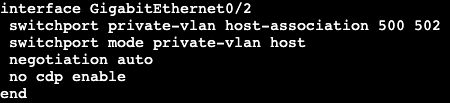
Host port & VLAN Association:

Mode Private VLAN Host and Primary to Secondary mapping (Community)
Mode Private VLAN Host and Primary to Secondary mapping (Isolated)

Assign Promiscuous:

After these configurations are in place, the two hosts in community VLAN 501 will be able to communicate with each other and the gateway at 192.168.1.254. Pings will fail going from H1 or H2 to the isolated VLAN member H3. H3 will only be able to communicate with the gateway.

NOTE:

  • If there were another member of the isolated VLAN, it would still not be able to communicate with H3.
  • Troubleshooting commands:
    • show interface gig0/0 switchport’
    • ‘show vlan private-vlan’
    • show vlan private-vlan type’

IPv4 First Hop Security

  • DHCP Snooping
    • Prevents DHCP server spoofing and exhaustion attack.
    • Enforces DHCP server role on ports.
      • Only trusted ports may respond to DHCP Discovers.
        • ie. Trusted ports are connected to DHCP server.
    • Maintains IP, MAC, and port binding.
      • Could be used for security enforcement.
    • Three main commands
      • ‘ip dhcp snooping’
      • ‘ip dhcp snooping VLAN x’
      • ‘ip dhcp snooping trust <interface>’
  • Caveats
    • Don’t forget to trust port to server.
      • Trust trunks as well as access port to DHCP.
    • DHCP snooping inserts information option
      • Adds empty giaddr field which IOS rejects.
    • Information option insertion could be disabled.
      • ‘no ip dhcp snooping information-option’
      • Alternative is configure server to trust empty giaddr.

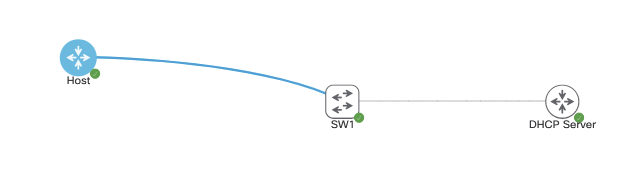
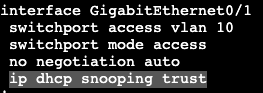
In the image above we have a host, switch and DHCP server. DHCP server is handing out addresses in the network 10.30.1.0/24 for VLAN 10, which our host is sitting in acting as a DHCP client. With DHCP snooping on, the configuration for our switch is as follows:

In global config we’re enabling DHCP snooping in vlan 10 and removing option 82 from the scenario. In addition we’re setting Gig0/1 as our trusted port that can receive DHCP requests.

When I shut/no shut the host interface, the host tries to get another IP address from our server and on the switch we see it’s checking it’s snoop binding entries to make sure this is okay.

Dynamic ARP Inspection (DAI)

  • Prevents ARP poisoning attack.
  • Inspects ARP requests/responses
    • ‘ip arp inspection VLAN X’
    • ‘ip arp inspection trust (port command)’
  • Enforces IP to MAC bindings based on DHCP snooping database

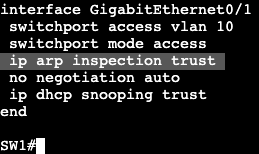
In global config we add arp inspection for VLAN 10 and allow our DHCP Server connecting interface to be trusted. Then we go into our host and manually change the MAC address of our interface and try pinging from our host to the DHCP server. In the switch we’ll see messages similar to this:

And of course the ping fails.

  • IP Source Guard
    • Prevents IP address spoofing
    • Uses DHCP snooping database to filter IPs on the port dynamically.
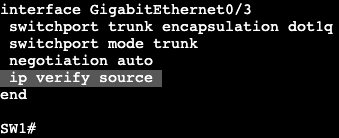
      • ‘ip verify source’ – interface command
    • MAC address filtering could be enforced as well.
      • Requires port-security enabled on interface.
      • Additional parameter ip verify source port-security.
    • Static IP to MAC mapping on a VLAN.
      • ‘ip source binding’ – global config command.

Notice it’s an interface level command on our untrusted port.

Dynamic ARP inspection WITHOUT DHCP:

  • If DHCP is not used static ARP mappings can be configured.
    • Takes precedence over dynamic ARP entries.
    • Configured using ARP inspection ACL.
      • ‘arp access-list x’
      • ‘permit ip host <ip> mac host <mac-address>
    • Applied to a VLAN
      • ‘ip arp inspection filter <NAME> VLAN y
arp access list
arp inspection filter referencing arp access-list

Port Traffic Control

  • Port-Security
    • Used to limit access based on MAC address
    • Violation modes
      • Shutdown (default)
        • Send port to err-disabled
      • Protect
        • Violators cannot send traffic in
      • Restrict
        • Violators cannot send traffic in
        • Switch sends syslog/snmp trap
    • Can be applied to trunk and access, not dynamic.
    • Secure MAC addresses
      • can only belong to one port
      • Static
      • Learned (dynamic)
      • Sticky
    • Trunk Ports
      • Support per-vlan limits (default unlimited)
      • Port limit is aggregate across all VLANs.
    • Keep in mind FHRP when using port-security
      • HSRP/VRRP/GLBP
    • Avoid using ‘protected’ mode on trunks.
      • Disables MAC learning once limit is reached for any VLAN.
    • Consider multiple MACs for IP phones.
  • Port Protection
    • Protected ports cannot exchange L2 frames.
    • Used to prevent devices on same VLAN from communicating at layer 3.
      • Switchport protected
      • Limited to one switch.
    • Ex. prevent compromised web server from launching DoS at other hosts within same VLAN.
    • Unknown unicast and multicast packets are allowed.
      • Could be disabled explicitly.
  • Static CAM Entries
    • Points to a fixed port.
    • Can be used for null routing.
  • Storm Control
    • Limits amount of Broadcast/Multicast/Unicast traffic allowed in port.
      • Ingress rate limiting only
    • ‘storm-control <xcast> level
      • Level is percent of interface speed, not bandwidth.

Switch ACL

  • Port ACLs
    • Applies to layer 2 switchports
    • Apply ingress only
    • Filter transit traffic.
      • Traffic ingress on the VLAN/port
    • Could be IP or MAC based.
      • MAC ACLs only affect non-IP traffic.
  • Routed ACL
    • Same as PACL but only apply to L3 traffic.
    • Apply to L3 ports or SVIs.
    • Ingress or Egress unlike PACL
    • Can only filter using IPv4 standard/extended ACLs.

Routed ACL example:

Both switches are running SVI VLAN 10 attached to Gig0/0 as trunk. Each can ping each other’s IP address:

SW1 – 10.10.10.21/16
SW2 – 10.10.10.22/16

We’re going to apply an extended ACL to SVI VLAN 10 to block telnet traffic that is currently available from SW2 to SW1.

Now if we do a ‘debug ip icmp’ we’ll see that we’re administratively blocked when trying to telnet from R2 to R1.

  • VLAN ACL or VLAN MAP
    • Apply to an SVI
      • Effective for all ports in this VLAN
        • Access and Trunk Ports
      • May inspect both IP and non-IP traffic
        • Matching based on IP or MAC ACL
        • Configuring an IP/MAC entry activates implicit deny.
      • Good for impacting all future ports in VLAN.
      • Don’t use implicit deny
        • May block STP or ARP.
      • Be careful when filtering L2 traffic.
        • STP and ARP could be easily blocked.
      • Account for the fact that ALL transit traffic is affected.
        • Be careful when filtering transit VLANs.

VACL Example:

Now the access-map needs to be applied to VLAN 10.

Note – When doing a VLAN access map, ICMP will not respond saying the traffic was administratively dropped like it does with a normal ACL. It quietly drops the packet.

Control Plane Policing/Protection

  • Control Plane Policing (CoPP)
    • Used to protect CPU from DoS attack.
    • Configured as QoS policing policy.
      • Not all matches supported in class-map
    • Applied under control-plane
      • ‘control-plane’
      • ‘service-policy input’

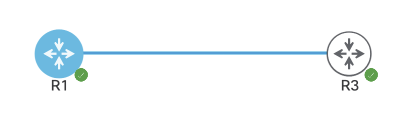
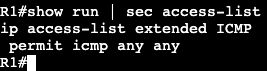
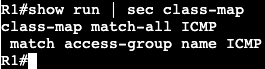
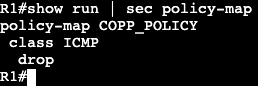
In this image above both routers are configured with the subnet 192.168.1.0/24, and R3 can ping R1. A CoPP policy below will stop this.

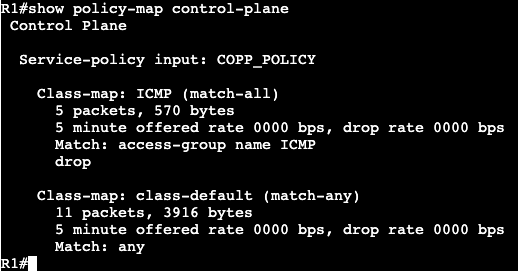
Now under ‘show policy-map control-plane’ we get this:

If we change the policy map to police instead of drop, we can just rate limit how much ICMP traffic is hitting the router control plane.

And now not all traffic is dropped, just rate limited as we can see in the ping above.

Above we can see that there were conformed packets, 33 that exceeded the policing and were dropped.

AAA

  • Authentication, Authorization, and Accounting
    • Old-Model
      • Local Authentication
      • Local authorization based on line/username settings.
    • New-Model
      • Supports AAA lists that define sequence of methods.
      • List can be bound to access technologies.
        • ie. Login or PPP
      • Default lists vs. explicitly assigned lists.
  • TACACS+ & Radius
    • Terminal Access Controller Access-Control System (TACACS)
      • Primarily for device authentication management.
        • ie. IOS admins
      • Supports per-command authorization and accounting
    • Remote Authentication Dial In User Service (RADIUS)
      • Primarily for end user authentication management
        • RAVPN
      • Does not support per-command auth and accounting.
    • Regardless which method used, local fallback should be configured.
  • Local Authentication
    • Default authentication method
    • Passwords are in clear-text by default.
      • service-password encryption
        • Encrypt in running config
      • username secret
Link connecting is 192.168.1.0/24

The image above are two default routers except for the subnet between them. R1 will have local basic user authentication setup with below commands:

Above specifies a local username/password and tells the box to accept the local login for SSH and telnet. From R3 if we telnet we’ll see the privilege level we get from this is privilege 1.

We would need an enable password to get into privilege 15.

Another way of getting in would be using ‘no login’ under the line vty settings. That will get us directly in.

  • Local Command Authorization
    • Privilege levels used to control access to exec commands
    • Default privilege levels
      • 0 – none
      • 1 – user mode
      • 15 – root
    • User Defined Privilege levels
      • Levels 2-14
  • Move command privilege down:
    • Allow privilege 1 to do specific tasks
      • examples
        • run extended pings
        • show running config
          • only see what you can configure.
  • Moving command privilege up
    • Revoke privilege 1 from
      • running show commands
      • using the enable command
  • Local command authorization change:
    • Modified with privilege command
      • exec | configure | interface | router | etc.
    • Configuration mode determines what option of privilege command to do:
      • ex.
        • Exec command
          • router#
        • Configure command
          • router(config)#
        • Interface command
          • router(config-if)#
    • Overhead is a lot for these commands. Better way is RBAC.
  • RBAC
    • Role-based access control
    • Replacement for privilege-levels
      • More flexible in terms of command allocation.
    • Role is a group of commands.
      • Known as parser view
    • Roles could be manualy switched to ‘enable view’
    • Roles could be assigned to users.
    • Roles should be configured from root view ‘enable view’
    • RBAC requires AAA enabled in router.
  • RBAC Configuration:
    • ‘aaa new-model’ must be entered first for this to work.
      • including ‘aaa authentication login default local’
    • Config for a parser view below:

I did not have to enter include commands. They automatically were put in after entering the exclude commands.

Now to enable the view the command ‘enable view first’ must be entered, followed by the password we entered in the original configuration.

Now the commands that show excluded in the output above will not work when logging into the router.

  • Config Change notification and logging
    • Local command accounting
      • tracks users and commands issued through CLI and HTTP
    • Configured as ‘archive’ and ‘log config’.

Now when we do a ‘show archive log config all’, we’ll see my changes:

I logged into the router with the user account cisco, created loopback interface 1 and assigned it the IP address 10.30.1.1/24.

  • Login Enhancements
    • Used to protect against brute force login attacks.
      • After X number of failed attempts, delay login.
    • ‘login block-for’

This will block logins for 10 seconds if there are 3 attempts failed within 60 seconds. It’s a way to slow down brute force login attempts and dictionary attacks.

OSPFv3

  • RFC 5340 – OSPF for IPv6
  • Transport via protocol 89 to unicast and multicasts FF02::5/FF02::6
  • Normal OSPF rules apply
    • Adjacency parameters same
    • OSPFv3 network types same
  • LSAs
    • Two new
      • type 8 (Link) – Used for link local
      • type 9 (Intra Area Prefix) – Used for prefixes on the link
    • Type 8 and 9 separate topology from NLRI
      • v2 has subnet info in LSAs 1 and 2 for Intra
        • if prefix add or remove, run full SPF.
      • v3 uses LSAs 8 and 9 to reference LSA 1
        • If stub network is add or remove, full SPF not required.
  • Configuration
    • Enabled at link level.
      • ‘ipv6 ospf <process id> area <area id>’
      • Automatically enables global process
    • Like EIGRPv6 and BGP, requires IPv4 router id.

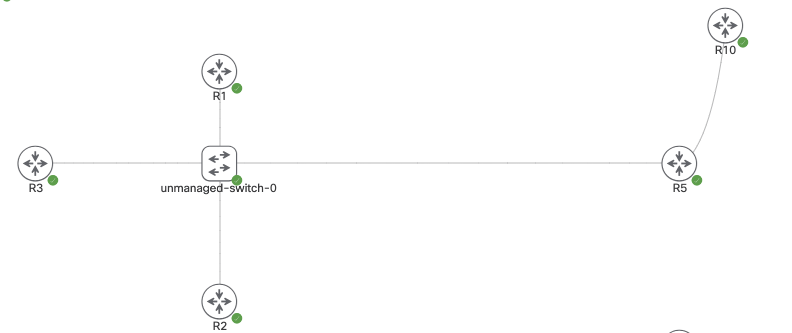
The topology above is running DMVPN and we’ll enable OSPFv3. R10 is a normal OSPF broadcast link, and the tunnel interfaces on R1-3 are point to point. R5’s tunnel interface is point-to-multipoint.

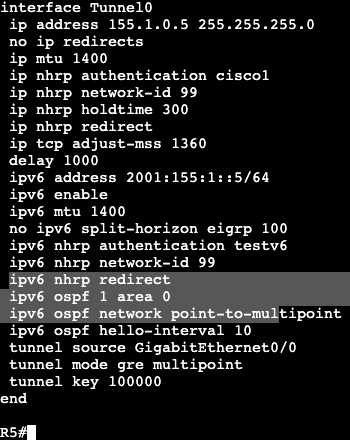
On the hub the below commands will be added to the interfaces:

On the DMVPN Tunnel interface the link OSPF command is entered, the network type is changed to point-to-multipoint, and the hello interval is now 10. The timer is changed due to the spokes being point to point.

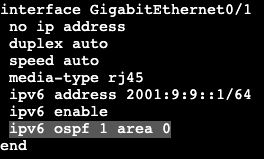
On the hub’s normal broadcast interface it will receive the normal ipv6 ospf command. This is the same for our normal non-DMVPN router hanging off of R5.

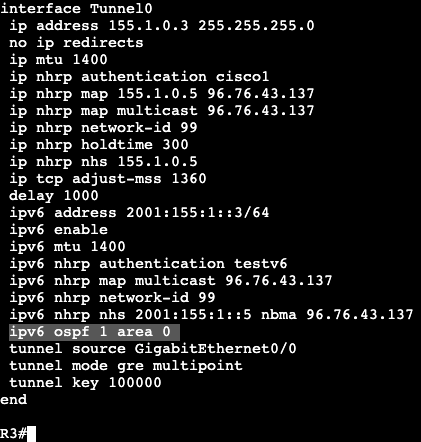
On our spokes each router will enter the following:

Just the normal ospf area 0 command. The timers do not need to be adjusted because the timers already were on the hub. The default OSPF network type on a tunnel interface is point to point, which matches what was changed on the hub.

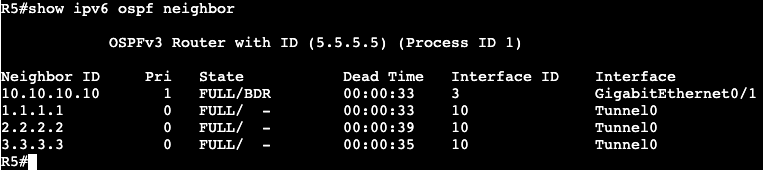
Notice that on the Hub’s adjacency list, all the neighbors have IPv4 router IDs.

In fact, when trying to form adjacency with the normal router R4, a router ID was manually added to the OSPF process because R4 is only running IP protocol version 6.

OSPFv3 Authentication:

  • Version 3 uses IPSEC for
    • Authentication
      • IPSEC AH or ESP
    • Encryption
      • IPSEC ESP
  • No ISAKMP support, keys manually entered.

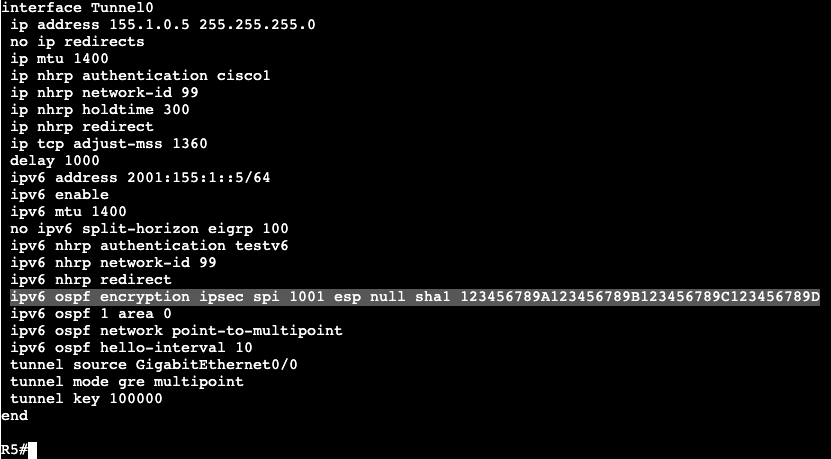
Below is an example of the configuration needed on OSPF neighbor interfaces:

This would need to be applied to all tunnel interfaces in the DMVPN topology, as well as the interface connecting R5 to R10.

The long string of numbers and letters are the key that needs to match on both sides of the neighbor relationship. This configuration was found under the Cisco OSPF docs.

Multiprotocol OSPFv3:

  • Can advertise both IPv4 and IPv6.
    • Two separate trees.
      • Each IP protocol runs independently.
    • To advertise IPv4 NLRI, must have both IPv4 and IPv6 on the link.
      • ‘ipv6 enable’ on transit links is min required for v6.
      • For IPv4 – can have all links unnumbered to Loopback interface.
  • Configuration
    • Enable on link
      • ‘ospfv3 <pid> <ipv4|ipv6> area <area #>
    • Options under OSPFv3 routing process.
      • ‘router ospfv3 <pid>’
    • show commands
      • ‘show ospfv3’

IPv6 EIGRP

  • Similar in operation to IPv4 EIGRP.
    • Transport via protocol 88 to unicast and multicast FF02::A
  • Not enabled by default with EIGRP classic mode.
    • ‘no shutdown’ needed under process.
  • Enabled on all IPv6 links in named mode.
    • ‘address-family ipv6 unicast <vrf> autonomous system <#>’
    • process not shutdown by default.
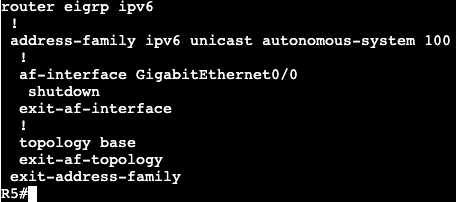
    • To exclude EIGRP link:
      • ‘af-interface Y’
      • ‘shutdown’
  • IPv4 Router-ID needed.

The topology above is running DMVPN Phase 3. R5 is the hub and R1-3 are the spokes. The topology is running IPv4 as the underlay/transport, and then each router has a loopback with IPv4 being advertised into EIGRP AS 1. In addition, each router has an IPv6 address that’s running over the top of IPv4 mGRE/DMVPN. There is no routing protocol yet running IPv6, which is what will be completed with EIGRP.

First step is to turn on EIGRP on each router with the below commands. It will be the same for all:

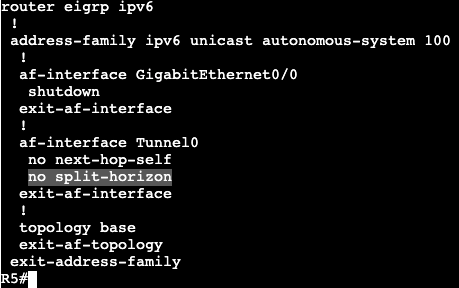
In addition there was another link added to R5 that is being advertised into EIGRP AS 100. After entering the config above the adjacencies began flapping up and down. Discovered the below command was missing under tunnel 0 on all routers:

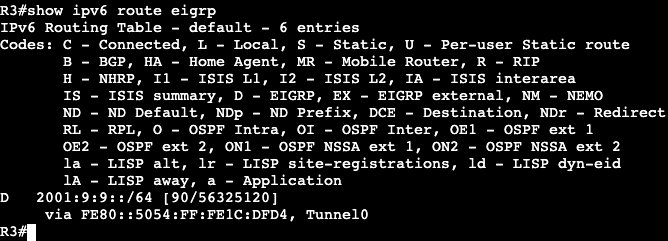
Now adjacencies are stable and on spokes we’re seeing a route from the extra link/network coming from R5, outside of the DMVPN domain.

Now on R1 an additional loopback was added with an IPv6 address that’s being advertised into EIGRP AS 100. On R3 when viewing the routing table we’re not seeing it, but we are in R5. This is because split horizon needs to be disabled.

Unfortunately there is a command under the tunnel interface ‘no ipv6 split-horizon eigrp 100’, but it does not work with EIGRP named mode.

R1 Loopback IPv6 2001:15:15::/64

Now R3 is receiving the route from R1’s loopback.

IPv6 DMVPN

  • DMVPN uses IPv4 mGRE for transport.
    • GRE is a multiprotocol encap.
    • Implies IPv6 can be supported.
  • How IPv6 over IPv4 DMVPN works.
    • Build IPv4 underlay and overlay.
      • IPSEC spoke to hub.
    • Use IPv6 NHRP to resolve IPv6 IGP or IPv6 BGP.

The topology above is running DMVPN Phase 3 with EIGRP. R5 is the Hub and R1-3 are the spokes.

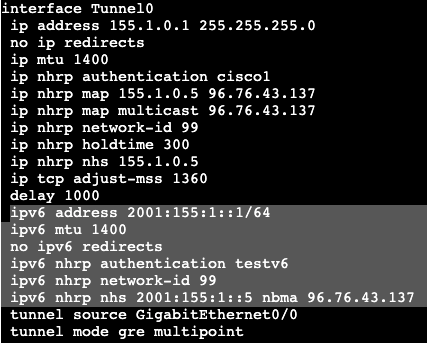
The below configurations will add IPv6 over the DMVPN configurations.

Hub:

Spoke 1:

Notes:

  • The hub basically gets an IPv6 address assigned to its tunnel interface, along with the standard NHRP commands. ‘ipv6 nhrp redirect’ is what enables phase 3 on the hub.
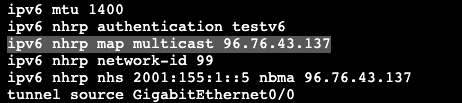
  • The spoke needs to get an IPv6 address assigned to its tunnel interface, standard NHRP commands as well. In addition, it needs to map the NHS to the IPv6 address of the hub, as well as mapping the NBMA to the hub’s actual physical transport address assigned to Gig0/0.
  • A ‘show dmvpn’ on the hub displays the DMVPN spokes as well as our IPv6 addresses that are getting tunneled over mGRE. The configuration is IPv6 over IPv4 DMVPN, but we could have used IPv6 as the underlay/transport as well.