Blog Feed

vManage API

  • Python Requests Library:

Authentication to vManage requires URL, username/’j_username’, password/’j_password’, ‘j_security_check’, and a session setup via token. The requests library can handle storing the token in a session for further GET requests.
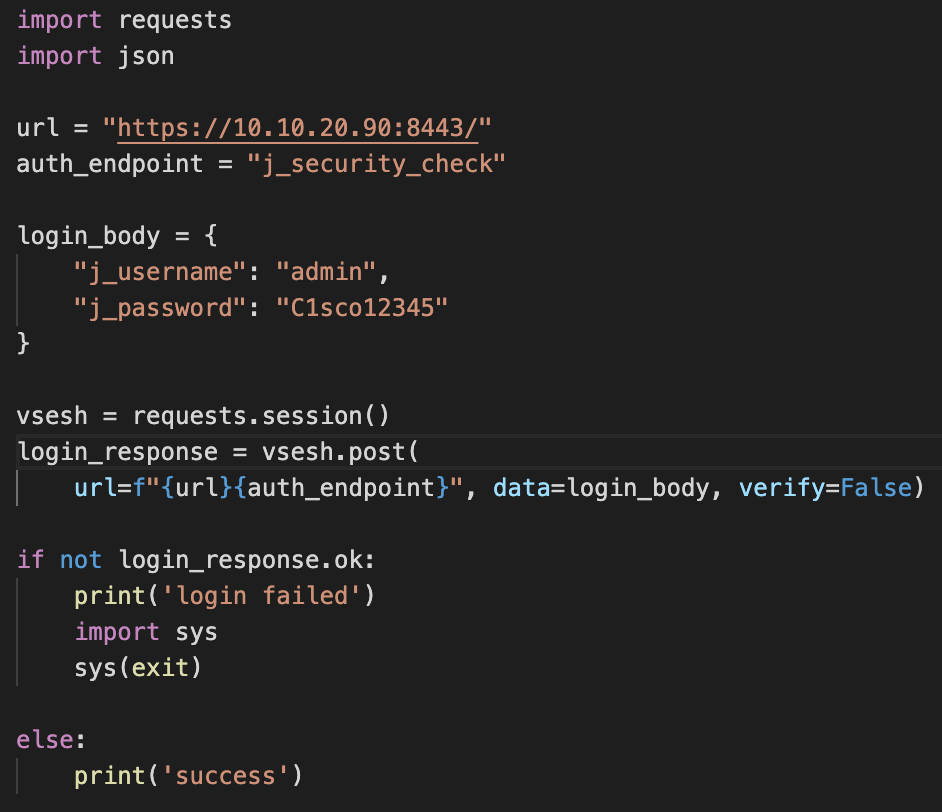
The bottom is an if else statement printing to screen whether the authentication was successful.

Once authentication is successful, the additional URL string can be added to gather information from vManage with the below code. The session, called vsession, will continue being used with a get (.get).
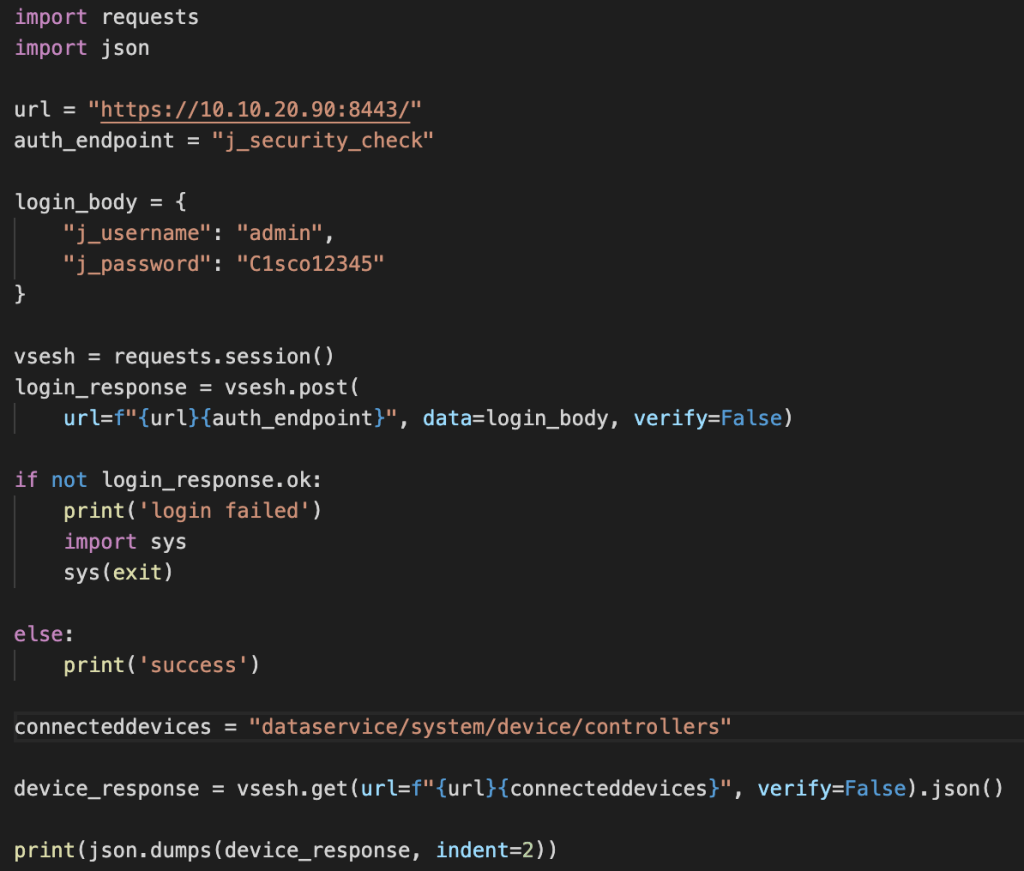
The device_response parameter has .json added to the end so that the data we’re getting back from vManage is in JSON. In addition, we’re using the json.dumps function to print the data on screen in JSON.

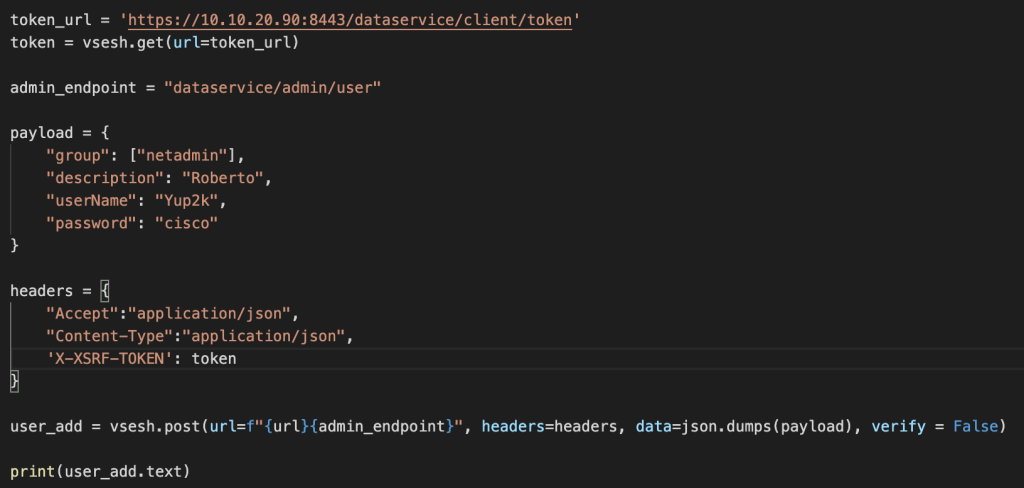
vManage firmware 19.2 moved towards requiring a token for each PUT/POST/DELETE request. Adding the token can be completed by requesting at the URL and adding to headers per below:

token_url = ‘https://<ip/fqdn&gt;:8443/dataservice/client/token’

token = vsesh.get(url=token_url)

headers = {‘X-XSRF-TOKEN’: token}

A post example of adding a new user account named ‘Yup2k’ is in the below image.
  • Postman:
  • Accessing the vManage API with Postman requires specific authentication parameters. Parameters are listed below:

    Under Body:

    Radio button x-www-form-urlencoded needs to be selected.

    Key – j_username – Value – username

    Key – j_password – Value – password

    Under Headers:

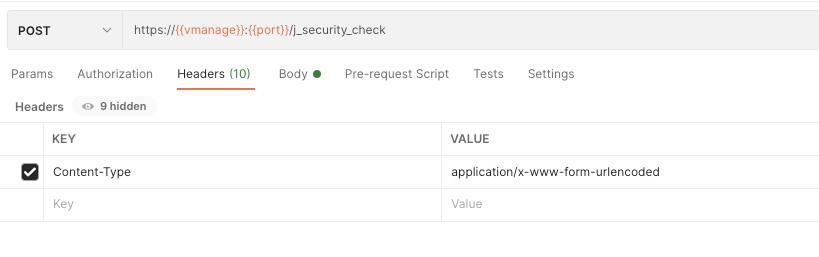
    Key – Content-Type – Value – application/x-www-form-urlencoded

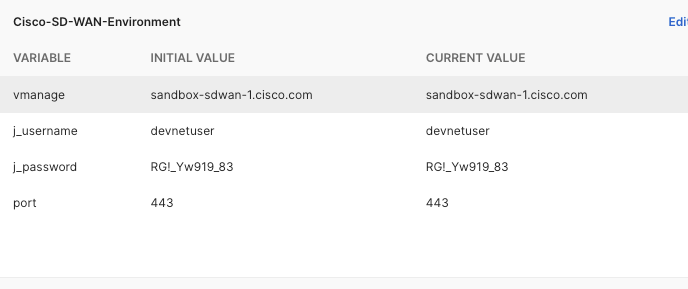
    The last image above is a Postman environment setup, which will make interacting with the API via Postman faster.

    The initial call needs to be a POST to the API endpoint <vmanage url>:<port>/j_security_check. Once this has been successful, additional calls gathering information or changing configuration can be completed.

    Something to be aware of are cookies. A cookie can sit in Postman and expire after a while. If the message received after authentication is HTTP Method Post is not supported by this URL, try going into Cookies and deleting all of them.

    For API endpoint information (specifically for Monitoring Endpoints and Configuration Endpoints), the documentation can be found here – https://developer.cisco.com/docs/sdwan/#!introduction .

    IOS-XE Guest Shell

    • IOS-XE Versions 16.6 and above come with Guest Shell.
    • Guest Shell is a virtualized CentOS environment.
    • Ultimately a container managed through Cisco’s IOx.
    • Enabling and Working with Guest Shell
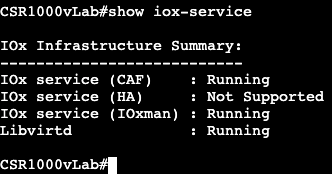
    Enabling IOx environment
    Confirms services are running

    Once IOx is enabled, we need to configure network interface settings for the guest shell. We will first create a Virtual Port Group that will act as the gateway for guest shell. The port group will need to NAT traffic outbound for the virtual environment to reach the outside world (or just to reach IOS-XE).

    Default Gateway for Guest Shell
    Access List and NAT statement

    Once NAT and gateway configuration has been completed, the vNIC settings will be configured under the app-hosting appid guestshell.

    vNIC Configuration

    And last but not least, the command to enable Guest Shell:

    guestshell enable

    Once the enable command has succeeded, the command ‘guestshell’ is all it takes to reach the linux prompt.

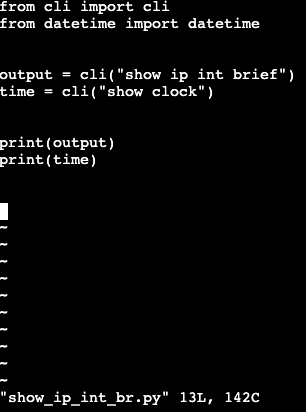
    The Guest Shell will out of the box have Python2.7 installed. In Python you can create scripts with vim, specifically with the ‘cli’ module, to interact with the command line. Below is a basic script that will display a show ip int brief.

    Once exited out of the Guest Shell and on our typical IOS-XE CLI prompt, you can run this script with the following:

    Once it’s confirmed the command ‘guestshell run python’ will work from IOS-XE, it’s very simple to use EEM for a python script to run after specific events happen.

    Embedded Event Manager

    • Way to trigger action when an event occurs on most Cisco IOS/IOS-XE/Cisco Flavor devices.
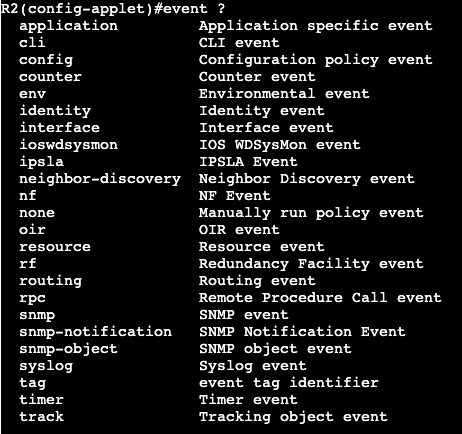
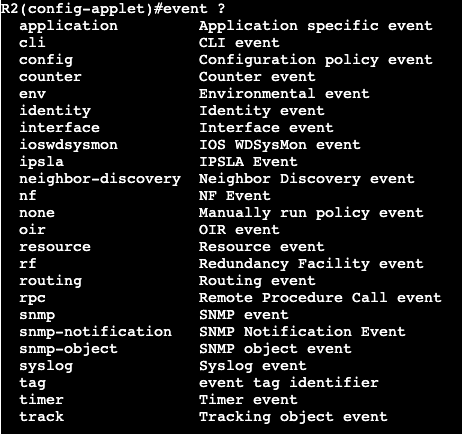
    • Events can be related to the following:
    • Following the event the following actions can be triggered:
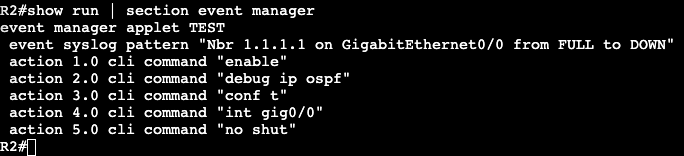
    • Often times EEM is used to track specific Syslog messages or interface status’. For example when an OSPF adjacency is lost, an event could be triggered to send an email out debugging. Example below:

    XML

    • eXtensible Markup Language
      • Open standard
      • Made up of Tags and Elements
        • Tag
          • Sits at beginning and end of data.
          • The start tag name is encapsulated with <>.
          • Specific name does not matter.
          • The end tag is encapsulated with </>
            • Ex. Begin <tagname>
            • Ex. End </tagname>
        • Element
          • Refers to data between tags.
          • Empty Element – <tagname />
      • Tag and element indentation does not matter.
      • XML Declaration:
        • At beginning of XML File and is optional.
        • Prepares XML processor to parse document.
          • ex. <? xml version = “#.0” encoding = “UTF-#”?>
      • Root
        • Main element of document
        • Top of Tree
      • Attributes
        • Elements can be associated with attributes.
        • Always follows a start tag.
          • Ex.start tag <tagname name=”value”>
          • Ex. end tag <tagname/>
      • Comments
        • Starts with “<!–” and ends with “–>”

    JSON

    • Open Standard widely used in Web APIs today.
    • Purpose mainly for data serialization.
    • Indentation is completely optional, except for with string literals.
    • MAIN DATA STRUCTURES:
      • Objects/Dictionary
        • Groups of key value pairs.
        • Key must be a string.
        • Value can be objects, numbers, lists, boolean, strings or Null.
      • Lists
        • Ordered sequence of elements.
        • Elements can be same type as object values.
        • Can be objects, numbers, lists, boolean, strings or Null.
    • Object/Dictionary ex.
      • Curly braces and double quotes encapsulate name:value pairs, separated by commas.
        • {“R10″:”4431”, “R20:”2921”, “R30″:3850”}
    • List ex.
      • Same as Python
      • Encapsulated with square brackets and double quotes, separated by commas.
        • [“R1”, “R2”, “R3”]
    • Multi-Line Notation – common, ultimately doesn’t matter because whitespaces do not matter.
    • Using JSON in Python

    import json

    with open(“example.json”) as f:

    data = f.read()

    jsonDict = json.loads(data)

    for k, v in jsonDict.items():

    print( “The key {} uses a {} value.”.format(str(k), str(type(v))) )

    • with open(“example.json”) as f:
      • With open for better exception handling and closes file when done.
    • json.loads(data)
      • What converts imported string (with open <file>) into JSON object/dictionary.

    Quality of Service

    Classification/Marking

    • Way to identify different types of packets and providing different treatment.
    • Classification:
      • ACL
        • Creating ACL specifying source/destination/port.
      • NBAR-Network Based Application Recognition
        • Automatic way of discovering types of traffic traversing router.
    • Marking:
      • Changing header fields.
      • IP packets have the Type of Service field that can be changed.
      • At layer 2, ethernet frames can use 802.1Q priority value.

    Queuing/Congestion

    • When a routing device receives packet it will figure out what interface it needs to forward on and sends on its way. If that interface is congested, for example when inbound traffic bandwidth is higher than outbound bandwidth, it will be placed in a queue.
    • Routing devices can have multiple queues with specific amounts of bandwidth allocated to each.
    • Queue Scheduling:
      • Round Robin – Cycles through queues in order, each queue getting fair amount to transmit.
      • Weighted Round Robin – Gives more preference to specific queues.
      • CBWFQ-Class Based Weighted Fair Queueing – Guarantees min bandwidth to each class when there is congestion. Weighted round robin, admin configures weighting as percentage of bandwidth on each interface.
      • Low Latency Queuing – Round Robin is terrible option for voice. Too much delay.
        • LLQ is priority queue that sends traffic immediately instead of waiting for other allocated bandwidth to transmit.
        • Queue Starvation – When priority/LLQ queueing is allocated too much bandwidth. When this happens all other queues begin dropping traffic.

    Policing

    • Limits bit rate by dropping traffic.
    • Often used by ISPs to drop customer traffic.
      • Ex. 1Gbps interface connected to customer device, customer only pays for 100Mbps circuit.
      • CIR

    Shaping

    • Shaper Queues traffic when going over specific CIR vs. dropping.
    • Creates problem where shaper halts all traffic, then sends, over and over again.
      • Creates a lot of delay.
      • This will break voice traffic.
      • Tc (time interval) of shapers can be configured, breaking up send and wait times more frequently.

    MPLS

    • Forwards based on labels instead of L3 destinations.
    • MPLS not much faster than today’s traditional IP forwarding, but MPLS does create less overhead.
    • Can forward any L3 protocols, not just IP.

    LSR

    • Label Switching Routers
      • Routers that run MPLS and can receive/transmit labeled packets.

    LSP

    • Label Switched Path
      • Entire labeled path through an MPLS Domain.
      • Sequence of routers.
      • Unidirectional.
        • Source to destination and vice versa can be completely different paths.
        • Often return is similar due to routing protocols.

    MPLS Header

    • Shim between layer 2 frame and layer 3 packet – hence MPLS L2.5
    • 4 bytes/32 bits.
      • 1st 20 bits – label number
      • 2nd 3 bits – experimental, used for QoS, similar to DSCP.
      • 3rd 1 bit – S field, used to show whether last label in stack.
      • 4th 8 bits – TTL, similar to IP TTL used to discard if reaches 0.

    LDP

    • Label Distribution Protocol
      • Uses Multicast to send hellos to other LDP routers, create neighbor adjacency.
      • UDP to discover neighbors. Adjacency built via TCP.
      • Transport Address is what’s used to build the TCP connection for adjacency.
        • Will choose an IP from neighbor router, need to make sure its actually routable in the IGP.
      • LDP generates a label locally for each prefix found in the RIB. Label information is then added to the Label Information Base (LIB).
      • LIB is used to generate info in the LFIB.
      • show mpls ldp bindings
        • shows LIB of MPLS router
      • show mpls forwarding-table
        • shows LFIB of MPLS router.
      • The Label Switched Path (LSP) can be seen through a traceroute on MPLS router.

    BGP – Notes

    IBGP and EBGP peer relationships:

    • Timers
      • Hold time – 180 seconds
      • Keepalive – 60 seconds
      • Default min time between advertisement runs – 30 seconds
    • Peer Groups
      • R1(config)#router bgp 100
      • R1(config-router)#neighbor <PEER GROUP NAME> peer-group
      • R1(config-router)#neighbor <PEER GROUP NAME> remote-as 100
      • R1(config-router)#neighbor <PEER GROUP NAME> update-source lo0
      • R1(config-router)#neighbor <PEER GROUP NAME> next-hop-self
      • Now apply below:
      • R1(config-router)#neighbor 10.1.1.1 peer-group <PEER GROUP NAME>
      • R1(config-router)#neighbor 192.168.1.1 peer-group <PEER GROUP NAME>
        • Efficient for smaller configurations.
        • Efficient for grouping configuration settings.
    • Session Templates
      • Anything relevant to the session
        • timers, remote-as, update-source, ebgp-multihop
      • R1(config-router)#template peer-session <NAME>
      • R1(config-router)#inherit peer-session <NAME OF ALTERNATE PEERSESSION>
      • R1(config-router)#remote-as 100
      • R1(config-router)#update-source lo0
      • R1(config-router)#exit-peer-session
      • R1(config-router)#neighbor 10.12.12.2 inherit peer-session <NAME>
    • Policy Templates
      • Anything relevant to policy
        • next-hop-self, filter-list; route-map
      • Inheritance is more flexible – inherit from up to 7 templates directly.
      • R1(config-router)#template peer-policy <NAME>
      • R1(config-router)#inherit peer-policy <NAME OF ALTERNATE PEERPOLICY>
      • R1(config-router)#next-hop-self
      • R1(config-router)#route-map <MAP NAME> out/in
      • R1(config-router)#exit-peer-policy
      • R1(config-router)#neighbor 10.12.12.2 inherit peer-policy <NAME>
    • Dynamic Neighbors
      • Allows BGP peering to a group of remote neighbors that are defined by a range of IP addresses.
      • R1(config-router)#neighbor <NAME> peer-group
      • R1(config-router)#neighbor <NAME> remote-as 100
      • R1(config-router)#bgp listen range 10.10.10.0/24 peer-group <NAME>
      • R1(config-router)#neighbor <NAME> transport connection-mode passive
        • Allows routers falling in subnet 10.10.10.0/24 to initiate BGP session with R1.
    • Network Command
      • Classful
        • R1(config)#router bgp 65000
        • R1(config-router)#network 1.0.0.0 – (classful, no mask required)
      • Classless
        • R1(config)#router bgp 65000
        • R1(config-router)#network 11.11.11.0 mask 255.255.255.0
    • Private AS Numbers
      • 64512-65535 – 16 bit numbers
      • 4200000000 – 4294967294 – 32 bit numbers

    Cisco Best PATH SELECTION:

    • Highest Weight
    • Highest Local Pref
    • Prefer locally originated
    • Shortest AS_Path
    • Lowest origin type
    • Lowest MED
    • Prefer eBGP over iBGP
    • Lowest IGP metric to the BGP NEXT_HOP
    • Oldest path
    • Lowest Router ID Source
    • Min cluster list length
    • Lowest neighbor address

    Well-Known, Mandatory Attributes:

    • AS-Path
    • Origin Code
      • i – IGP
      • e – EGP
      • ? – Redistribution
    • Next Hop Value

    Well-Known, Discretionary

    • Local Preference
      • Outbound traffic decisions
      • Default – 100
      • Higher is better
      • iBGP Transmitted, does not pass anywhere else.
    • Atomic Aggregate

    Optional, Transitive

    • Aggregator
    • Community

    Optional, non-transitive

    • Multi-Exit Discriminator
      • Advertising Metric on prefix information.
      • Lower Value preferred
    • Originator ID
    • Cluster List
    • Cluster ID
    • Weight

    OSPF – NOTES

    OSPF Neighbor Formation:

    • INIT
      • ACL blocking traffic one way
    • 2-WAY
    • Exstart
    • Exchange
      • MTU Mismatch
    • Loading
    • Full
      • Loading to Full – Desired for neighbor adjacency

    Network Types:

    • Point to Point
      • No DR/BDR.
      • Two Devices.
      • Multicast approach – 224.0.0.5 – All SPF Routers Address
      • Automatic network type under HDLC.
      • Hello 10, Dead 40, Wait 40, Retransmit 5
    • Broadcast
      • DR/BDR
        • Eliminates mesh of neighbor adjacencies in multiaccess network.
        • Minimizes number of LSA updates when network changes.
        • 224.0.0.6 – AllDRouters – DR/pseudonode communication
    • Non-Broadcast MultiAccess
      • Legacy Frame Relay
      • DR/BDR – Packets are unicast, not multicast.
    • Point to Multipoint
      • Collection of Point-to-Point links. No DR/BDR
    • OSPF Virtual Link
      • Bandaid for connecting all areas to backbone area 0.

    Path Preference:

    • Cost – Sum of all outbound interfaces.
    • Cost can be adjusted by interface
      • router(config-if)#bandwidth <value>
      • router(config-if)#ip ospf cost <value>
        • default reference value is 100Mbps
    • router#show ip ospf border-routers
      • Displays all ABRs and ASBRs.
      • Displays cost to reach prefixes.
    • Path Selection List:
      • 1. Longest prefix/specific match
      • 2. Intra-area routes
      • 3. Inter-area routes
      • 4. E1
      • 5. E2
      • 6. NSSA1
      • 7. NSSA2

    LSA Types:

    1. Router – Flooded within Area – Intra
    2. Network – Used by Designated Router. Advises on other adjacencies in multiaccess network.
    3. Network Summary – How prefixes are advertised from one area to another. IA – Inter-Area.
    4. ASBR Summary – Used to identify router that is ASBR.
    5. AS External – Prefixes that come in from ASBR (Redistribution – E1, E2).
    6. Group Membership – Was used for Multicast-OSPF – not really used.
    7. NSSA External – Allows prefixes to be advertised into Not So Stubby Areas.
    8. External Attributes – iBGP alternative – not really used.
    9. – 11 – Opaque LSAs – Opened up OSPF for other applications to include information.

    Network Types:

    • Backbone/0:
      • LSA #s – 1, 2, 3, 4, 5
    • Non Backbone, Non Stub:
      • LSA #s – 1, 2, 3, 4, 5
    • Stub:
      • LSA #s – 1, 2, 3
    • Totally Stub:
      • LSA #s – 1, 2
      • LSA # 3 default route only!
    • Not So Stubby Area
      • LSA #s – 1, 2, 3, 4, 7

    OSPF OPTIMIZATIONS:

    • ISPF
      • Incremental Shortest Path First calculations
      • Stops entire tree within area from reconverging
      • R1(config-router)#ispf
    • Hello & Dead Timers
      • R1(config-if)#ip ospf hello-interval <# in seconds>
      • R1(config-if)#ip ospf dead-interval <# in seconds>
      • Breaks neighborships until both neighbors match intervals
      • show ip ospf int <interface> – shows the timers on the interface
    • R1(config-router)#max-lsa <#>
      • Number of non-self generated LSAs that this router can keep in database

    Prefix Filtering/Suppression:

    • Prefix filter with route map (ex. deny single prefix)
      • R1(config)#access-list 1 permit 1.1.1.0 0.0.0.255
      • R1(config)#route-map <NAME> deny 10
      • R1(config-route-map)#match ip address 1(ACL #)
      • R1(config-route-map)#route-map <NAME> permit 20
      • R1(config-route-map)#end
      • R1(config)#router ospf 1
      • R1(config-router)#distribute-list route-map <NAME> in
        • Feature works inbound on router
      • Only applies to local router. Downstream routers will still have route if they typically would with normal OSPF operations.
    • Filter-List (ex. deny single prefix – LSA Type 3 Filtering)
      • R1(config)#ip prefix-list <NAME> deny 1.1.1.0/24
      • R1(config)#ip prefix-list <NAME> permit 0.0.0.0/0 le 32
      • R1(config)#router ospf 1
      • R1(config-router)#area 0 filter-list prefix <NAME> in
        • Feature works both inbound and outbound.
    • Route Poisoning
      • R1(config)#access-list 1 permit 1.1.1.0 0.0.0.255
      • R1(config)#router ospf 1
      • R1(config-router)#distance 255 0.0.0.0 255.255.255.255 1(access-list number)
      • Makes route look unreachable – AD of 255
    • Internal or Area Summarization
      • ON ABR:
        • R1(config-router)#area 10 range 1.0.0.0 255.0.0.0
        • Summarization for inter-area routes
    • External Summarization
      • ON ASBR:
        • R1(config-config)#summary-address 1.0.0.0 255.0.0.0

    EIGRP – Notes

    PACKET TYPES:

    • Hello/Ack
      • Neighbor Discovery
      • Multicast advertised on segment, and Unicast responses are returned.
      • Hello with no Data is Ack.
      • Also Keepalive.
    • Updates
      • Conveys reachability information for each destination.
      • Sent reliably.
    • Queries
      • Sent out to search for another path during convergence.
      • Multicast looking for missing prefix.
    • Replies
      • Sent in response to Query, brings prefix from active back to passive (good).
      • Sent reliably.
    • Request
      • Used to obtain specific information from neighbor.

    Stuck in Active:

    • EIGRP router goes into SIA state and removes neighbor adjacency if it does not receive response to query after 3 minutes.
    • Continues propagation of query traffic across EIGRP domain.
    • Condition where EIGRP router goes active for specific route by sending query, but never receives a reply.

    EIGRP Graceful Shutdown

    • Enabled by Default
    • Neighbor will receive ‘PEER-TERMINATION’ message, implies EIGRP was turned off on interface, do not wait for hold timers.
    • Does not work with an interface shutdown. Has to be removal of EIGRP interface or process.

    EQUAL COST LOAD BALANCING:

    • Multiple paths in RIB for same destination prefix – ECMP

    UNEQUAL COST LOAD BALANCING:

    • Installation of both successor routes and feasible successors into the EIGRP RIB.
    • Variance value can be modified to enable this feature. Variance value is the FD (best available route metric – successor) multiplied by the variance multiplier.
      • Any feasible successor’s FD with metric below EIGRP variance value is installed into RIB.
      • Feasible Successor needs FD to be less than successor route multiplied by variance value.

    EIGRP Stub Routing:

    • Stub router will advertise all connected and summary routes to upstream EIGRP speakers (Default).
    • Stub router never gets queried by upstream EIGRP speakers for route information.
    • Helps with using branch as traversal for link failure.
    • Branch(config-router)#eigrp stub (default advertise connected and summary)

    EIGRP Finite State Machine:

    • All the states and processes that DUAL uses to compute metrics and routes.
    • Passive route states equate to a stable network and no re-computation being needed by DUAL.
    • Active route states equate to DUAL re-computing metrics and/or locations for routes.
      • No feasible successor begins query to EIGRP neighbors.

    EIGRP Add Path:

    • DMVPN Feature
    • Allows for load balancing traffic between two spokes over EIGRP.
    • By default a hub will not advertise more than one route to a spoke destination, even if the hub has two equal cost paths. If a spoke lost a primary route EIGRP would have to reconverge.
    • Configure:
      • HubRouter(config)#router eigrp NAMEMODE
      • HubRouter(config-router)#address-family ipv4 unicast autonomous-system 1
      • HubRouter(config-router-af)#af-interface tunnel1
      • HubRouter(config-router–af-interface)#add-paths <number of paths>

    EIGRP LOOP FREE ALTERNATE FAST REROUTE

    • Allows for taking a backup path in the network within 50ms
    • Installs both the Successor and Feasible Successor in the routing table, not just successor. Lowers failover time.
    • Interior Gateway Protocols calculate LFAs using 2 methods:
      • Per-Link:
        • Found in multiaccess segments.
        • All links use the same next hop address.
        • Single secondary backup link.
        • Less CPU and simple to calculate.
      • Per-Prefix
        • Calculates LFA for each destination.
        • Enforces FRR or failover uses two different backup routes or next hops.
    • If there are multiple LFAs then FRR needs to choose one. List of tie breakers below, lower metric wins:
      • Interface Disjoint
        • Do not choose an LFA that goes out the same interface – 20
      • Linecard Disjoint
        • Do not select LFA that exits out same line card – 40
      • Lowest Repair Path Metric
        • Choose LFA with lowest metric – 30
      • Shared risk Link Group (SRLG)
        • Prefer LFA not sharing the same Share Link Group

    EIGRP Summary Leak Map

    • Advertises more specific route(s) on interface in addition to summary.
      • 1 – Create access list
        • R1(config)#ip access-list standard Leak
        • R1(config-std-nacl)#permit 10.30.1.0 0.0.0.255
      • 2 – Create Route Map referencing access list
        • R1(config)#route-map Leak-Example 10
        • R1(config)#match ip address Leak
      • 3 – Use summary command under interface
        • R1(config)#interface Gig0/2
        • R1(config-if)#ip summary-address eigrp 1 10.30.0.0/16 leak-map Leak-Example
    • In the routing table of neighbor there is now a summary address (10.30.0.0/16) and a longer prefix route of 10.30.1.0/24

    EIGRP Stub

    • Typical EIGRP configuration for branch routers.
    • Way to stop queries from being sent to a router when there are topology changes or links going down.
    • Types of EIGRP Stub networks:
      • Redistribute – Stub router can advertise redistributed routes.
      • Summary – Stub router can advertise summary routes.
      • Connected – Stub router can advertise directly connected.
      • Static – Stub router can advertise redistributed static routes.
      • Receive-only – Stub router does not advertise any networks, only receives.
    • Default ‘eigrp stub’ command uses connected and summary.

    EIGRP Stub Leak-Map

    • Similar to EIGRP Summary leak map, allows router to be configured as stub but still have exceptions for routes being advertised.
    • R1(config)#router eigrp 1
    • R1(config-router)#eigrp stub leak-map <name of created route-map>