Blog Feed

EIGRP Route Filtering

  • EIGRP is a distance vector routing protocol.
  • The entire EIGRP topology is not known by each speaker like in Link State.
    • This means filtering and summarization can occur on any node in the network.
  • Methods:
    • Distribute Lists, with Route-Maps
    • AD
    • Passive Interface
    • Distribute
    • Route Tags
    • Per Neighbor Prefix Limits

Distribute List Filter:
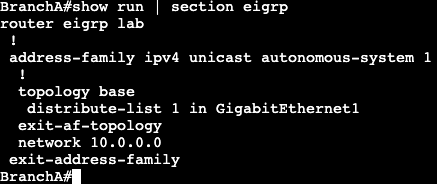
– Done with access-list and applying via distribute-list in topology base or router eigrp <as>
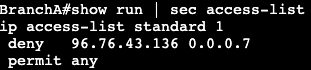
Access list matching prefix being filtered.
Access list applied as ‘distribute-list’ under topology base in EIGRP Named Mode
Access list applied as ‘distribute-list’ under router eigrp in EIGRP Classic Mode

Same can be done with an IP prefix list as well. With the distribute-list command the name of the IP prefix list will be used instead of an access-list number. A prefix list will give more control over bit boundaries with the ge (greater than) or le (less than) option.

Administrative Distance:
– Setting the distance to 255 can stop routes from coming into routing table.
– In EIGRP this can be set under topology base.

First step is creating an access-list that matches the prefix that’s being filtered.

Then under topology base in EIGRP, setup the distance command.

255 is what the administrative distance value. 0.0.0.0 is the source, in this case we’re saying that route coming from anywhere. 255.255.255.255 is the wildcard for the source, and 2 is referencing the access list created.

Route Map with Tag:

Routes can be modified or labeled with a tag by using a route map set statement. This can then be used to filter or modify downstream via the tag value. Example below.

First step is to create a prefix list matching the prefix that’s going to be tagged.

Then a route map needs to be created that references the prefix list and uses the set tag option. In this example the tag is being set to 10.
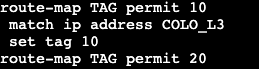
The ‘route-map TAG permit 20’ is needed at the bottom to allow all other traffic to pass. There’s always an implicit deny at the end of each route map.

Next step is adding the route map to the EIGRP process.

TAG is the name of the route-map created, in is the direction we’re applying the route map, and Gig1 is the interface.

Now when doing a show ip route 3.3.3.3, there’s a tag value being applied.

The same tag value can be seen now on routers BranchA is advertising to downstream.
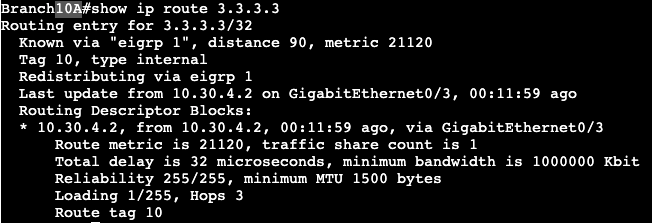
Branch 10A, downstream router from BranchA

All of these features makes EIGRP very flexible. These types of route filtering and modification in other routing protocols often can only be completed during redistribution or when hitting an area border.

EIGRP Stub

  • Method to contain QUERY domain.
  • Good design option for DMVPN spokes.
    • Or hub and spoke topologies in general.
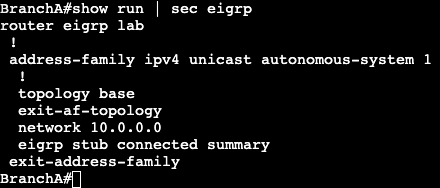
  • At a remote branch/location often times there’s only has one primary mode of transit back to the enterprise network. If the remote branch is setup as a regular EIGRP router, then every time there’s a topology change, anywhere, the remote branch router will receive a query from its neighbor (probably hub) asking if it knows the downed prefix. A stub EIGRP router will never receive these queries because it is assumed there’s no other EIGRP speaker behind the branch/spoke gateway.

Configuration is very simple. In Named Mode it’s under the Autonomous System.

In Classic Mode it’s under ‘router eigrp <as>’.

Note advertising connected and summary is default.

EIGRP Leak Maps

  • When advertising summary in EIGRP, a leak map can be used to throw in a more specific prefix if needed.
  • Can be used for traffic engineering.
  • Applied to a router via route map.

Configuration:

Prefix List

Route Map

EIGRP Summary Statement with Leak Map

The command ‘summary-address 10.20.0.0 255.255.0.0 leak-map leakmap‘ summarizes the 10.20.0.0 loopback IP addresses, and leaks the more specific 10.20.1.0/24 address to the EIGRP neighbor. The EIGRP neighbor’s routing table now looks like below:

EIGRP Summarization

  • Used specifically to minimize QUERY message domain
  • QUERY domain containment
    • Summarization
    • Stub router advertisement
  • QUERY message
    • Generated when route becomes Active
      • Active meaning node is asking if there’s another route to a destination.
      • Link loss
  • Auto Summary
    • Classful summarization
  • Manual Summary
    • Classless, defined by operator.
    • Supports any bit boundary.
    • Automatically suppresses subnet advertisements.
    • Can advertise subnets through leak-mapping.
    • Classic EIGRP
      • ‘ip summary-address eigrp’ under interface
    • Named EIGRP
      • summary-address at af-interface
  • EIGRP summaries are not hierarchical.
    • Can be done anywhere unlike OSPF.
  • Below is a config for EIGRP Named Mode:

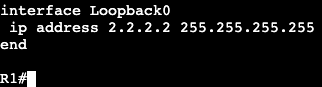
Instead of going to the physical interface configuration, it’s all done in the address family af-interface config. On router R1, there’s a Loopback interface that has a /32.

But the EIGRP neighbor, R2, is receiving a /16 route to the loopback now.

  • Summary routes inherit metrics from the longer prefixes/subnets.
    • Will use the best metric.
      • Change of the best metric means the summary will be re-advertised.
      • summary-metric can help fix this.

EIGRP Authentication

  • Types of Auth:
    • MD5
    • HMAC-SHA256
  • SHA
    • Only EIGRP Named Mode
    • No Key chains
    • SHA uses static key
  • MD5
    • Both EIGRP Named and Classic Mode
    • Uses key chains
    • Supports auto key rotation.
  • Key chain supports multiple key numbers.
    • Router always sends lowest key.
    • Rotation of keys is done by defining the validity.
  • Configuration Classic EIGRP:
    • Authentication mode setup on interface
      • ‘ip authentication mode eigrp <AS> md5’
      • ‘ip authentication key-chain eigrp <AS><Key>’
      • ‘accept-lifetime’
        • How long key is valid to be received.
      • ‘send-lifetime’
        • When is key valid to be sent.
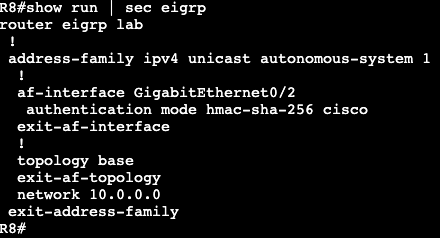
  • Configuration EIGRP Named:
    • Use of MD5 or SHA is under af-interface.

EIGRP Routes/Load Balancing

  • Feasibility Condition:
    • Used for selecting backup paths.
    • Pre-computed during DUAL
      • Advantages
        • Sub-second re-convergence when successor fails.
        • Fault isolation.
          • No need to speak with neighbors about additional paths.
        • Unequal cost distribution.
    • What the process is doing:
      • Find best path, hold onto local metric.
      • Find second best path.
        • Any router with metric lower than mine, they’re closer to destination.
        • Any router with metric equal or higher than mine, forget about them.

  • Successor – Best Path
  • Feasible Distance – Metric of Successor
  • Reported Distance – Metric of neighbors
  • Feasible Successor – Backup paths that meet Feasibility Condition
  • Only Feasible Successors can be used for unequal cost load balancing

Reconvergence:

  • If no FS:
    • Sends route into Active state
    • Sends QUERY to all neighbors
    • Reconverges from neighbor REPLY
  • With FS:
    • No route Active
    • FS promoted to Successor
    • QUERY not generated
    • Results in sub-second convergence

Bandwidth and Delay

  • Bandwidth
    • DUAL uses the lowest bandwidth along a path to a destination.
    • By prefix.
  • Delay
    • DUAL uses delay by adding up hop by hop to destination.
    • Can be modified under interface with ‘delay’ command.

Unequal Load Balancing:

  • Only Feasible Successors allowed.
  • Controlled with Variance command.
    • FD * variance > FS, load balancing happens.
  • Commands:
    • router eigrp <name>
      • address-family ipv4 autonomous-system <AS #>
      • topology base
      • variance <variance multiplier>

EIGRP Wide Metrics

  • Classic EIGRP Problem
    • Loses bandwidth visibility at 10 Gbps.
    • Anything 10Gbps and above has metric of 256
    • Same with Delay, anything above 1 GigE = 10
  • Wide Metrics
    • Only in named mode.
    • Automatically turned on when using named mode.
    • 64 bits.
    • Scales higher
    • Bandwidth
      • 10^7 * 65536/Interface Bandwidth
      • Called Throughput
    • Delay
      • Uses picoseconds instead of microseconds.
      • Called Latency
  • IOS RIB
    • Only supports 32 bit metrics
    • After DUAL runs, metric is scaled down to fit into RIB.
    • Default scale is 1/128, can be modified with below command
      • ‘metric rib-scale’
        • All the way down into AF AS

EIGRP Classic Metrics

  • EIGRP uses lowest metric of the following:
    • Bandwidth
      • Lowest value across path to destination.
    • Delay
    • Load
    • Reliability
  • Only Bandwidth and Delay used by default.
    • EIGRP Classic Bandwidth is 10^7 * 256/Interface Bandwidth
  • K values need to be the same between neighbors.
    • Adjacency will not form if they’re different.

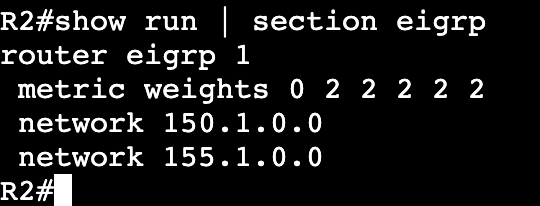
‘show ip protocols’ will show the K values…..

And if they’ve been changed it can be seen in running config.

If the metric weights line is removed all K values go back to default and adjacency comes back.

EIGRP Named Mode

  • Multi-Address Family.
  • 15.x code and above.
  • Config is all under a global process.
  • Feature parity between IPv4 and IPv6
  • Configuration:
    • Enable global process
      • router eigrp [process name]
    • Enable AF
      • address-family <ipv4 or ipv6> unicast autonomous-system <AS>
    • Enable interface
      • network <address> <wildcard>
  • IOS 15.4S supplies conversion from classic to named.

Classic EIGRP

  • Prior to named mode (15.x)
  • Uses autonomous system number still, no name for AS.
    • ‘router eigrp <as number>
  • Hello messages to find neighbors are sent on Multicast 224.0.0.10.
  • Updates are sent between routers via unicast.
  • In header shows protocol number 88.
  • Configuration:
    • R1(config)#router eigrp 1
    • R1(config-router)#network 192.168.1.0 0.0.0.255
      • Needs autonomous system number to match for adjacency.
      • Needs wildcard number if not using classful networks.
  • Verification:
    • show ip eigrp interfaces
      • Similar to ‘show ip ospf int brief’
    • show ip protocols
    • debug eigrp <?>
    • show ip eigrp topology
      • Shows successors and feasible successors.
    • show ip eigrp neighbors
      • Q count should be 0. If not there may be congestion on the network.