Blog Feed

MPLS PE-CE with BGP

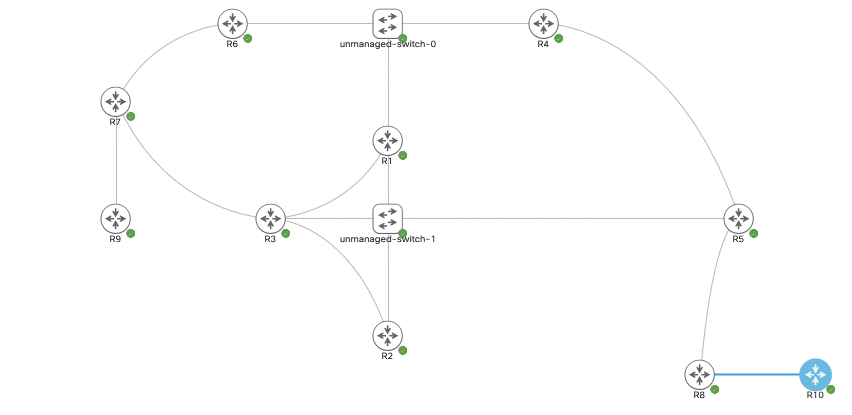
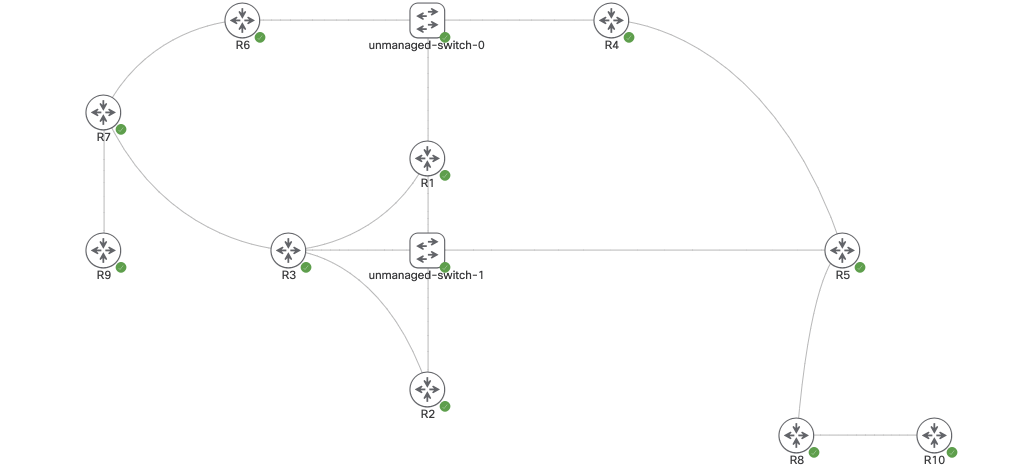
In the image below, we’re running MPLS L3VPN with BGP on both the provider and customer ends – ie. PE/P and CE.

ASN List:

R9/R7 – CE, ASN 1000
R10 – CE, ASN 1000
All other devices – Running ASN 100.

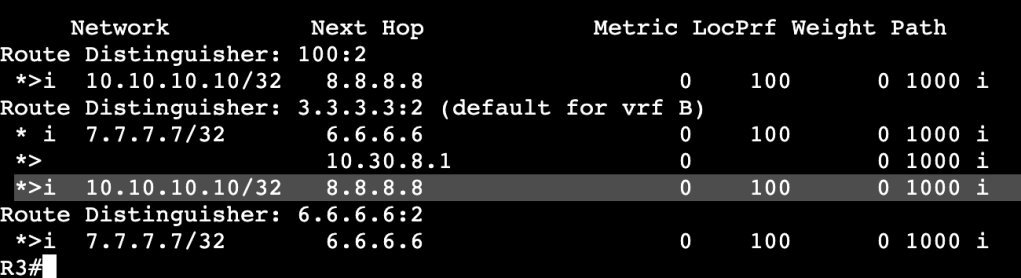
In this scenario the customer wants to run the same ASN on both remote ends of the MPLS L3 VPN. R10 is exchanging it’s loopback 10.10.10.10/32 across the VPN to R7 and R8, but unfortunately it’s not showing in the remote end’s routing tables.

The route 10.10.10.10/32 looks to be advertised or received all the way up to R7, where it does not show. The reason for this is due to BGP’s built in loop prevention mechanisms. If the same ASN is found in a route that’s the local ASN then the route is dropped.

AS-Override

AS-Override is the first option to fix this. The configuration is advertised outbound on R6 to R7, which will change from R7’s perspective what ASN the route 10.10.10.10 is coming from.
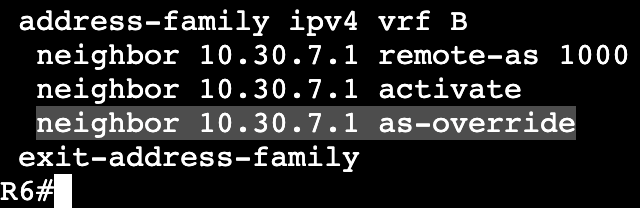
Under R6’s VRF Address family we add to the neighbor command.

Now on R7 we see that R10’s loopback is successfully making it to the routing table via R6.

AS-Override in general is creating another problem though in that it removes the original ASN from the path the route is advertised from. This is breaking the built in loop prevention for BGP. When AS-Override is used it allows for the route coming from R10 to get advertised back into ASN 1000 on R10’s side, creating a loop. A method of fixing this is a with a route tag called Site of Origin (SoO).

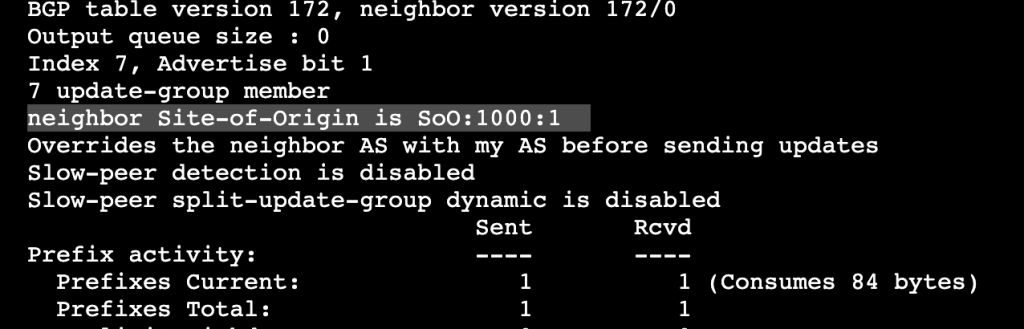
Site of origin is an extended community that throws a tag on routes routes as they’re advertised outbound. In this situation it will allow R6 and R3 to compare tags and if they match, the two routers know they have the same route and no need to advertise back to each other.

The configuration is straightforward. On R6 and R7 we’ll configure the following:

Under AF we’re specifying the soo tag (extended community) that will match on both R6 and R3. Since they match they’re aware the route does not need to be advertised to each other which would create a loop. The SoO can be seen under ‘show ip bgp vpnv4 all neighbor <neighbor address>

MPLS PE-CE Routing with EIGRP

In the topology below we’re still running iBGP between R8 and R7, and the goal is to run EIGRP as the internal customer routing protocol. We’ll be redistributing EIGRP into the BGP process that is then crossed over VPNv4.

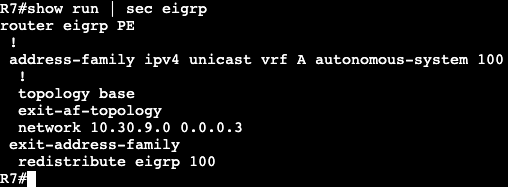
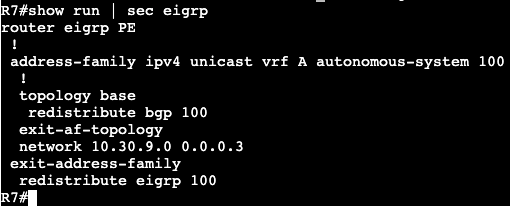
First we’ll create EIGRP domains on each customer site. R7<–>R9 and R8<–>R10 EIGRP adjacencies will be formed in VRF A. Below will have R7 and R9 but R8 and R10 will be identical.

R9 will have a normal EIGRP configuration advertising all networks (0.0.0.0).

And R7 will have a similar configuration except it will setup the EIGRP config in VRF A

The interface connected to R9 has already been assigned VRF A and has an IP applied. Because of this the neighbor adjacency comes up. Note- we’re not creating an adjacency with R3 which is part of the P network, hence the smaller network statement on R9, our PE.

The adjacency can be seen with a ‘show ip eigrp vrf A neighbor’.

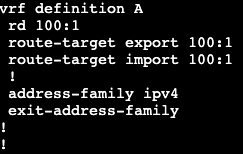
The configuration for iBGP over the MPLS domain is already setup between R7 and R8, and that can be seen with a simple ‘show ip bgp summary’. In addition, our VRF already has the Route Distinguisher and Route Targets imported and exported, as seen below:

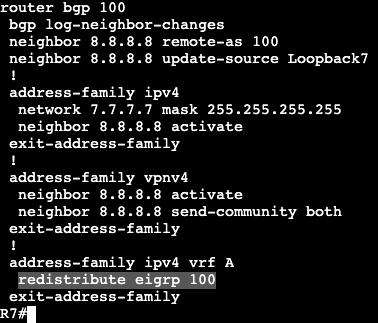
So now to advertise EIGRP routes over the BGP tunnel, we just need to redistribute between the two routing protocols.

EIGRP into BGP:

BGP into EIGRP:

Note this needs to be completed under ‘address-family ipv4 vrf A’.

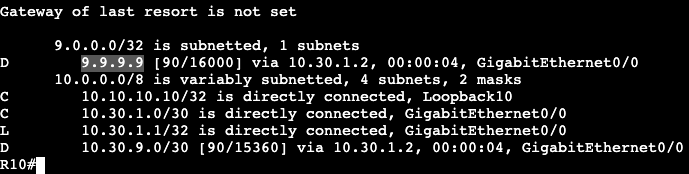
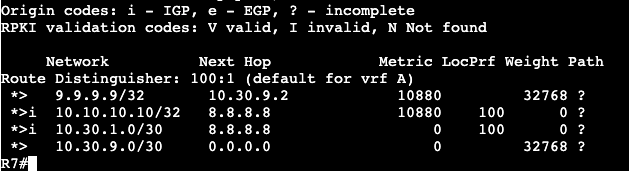
Now- when checking the global routing table of R10 (across iBGP and MPLS domain), we see that the Loopback for R9 is in the routing table.

This can also be seen from the BGP VPNv4 table – ‘show ip bgp vpnv4 all’

Note- these routes are showing up as internal routes instead of external for both routing protocols.

For EIGRP this allows feasibility condition to be spread across sites.

MPLS L3 VPN Troubleshooting

  • Is LDP Enabled?
    • ‘show mpls interfaces’
  • Is LDP Transport working?
    • ‘debug mpls ldp transport events’
  • Is LDP session authenticated?
    • Like BGP, LDP uses TCP auth (option 19)
  • Are labels actually bound?
    • ‘show mpls ldp binding’
    • ‘show mpls forwarding-table’
    • ‘debug mpls ldp binding’
  • Is allocation being filtered?
    • Advertise filter vs. allocate filter.
    • Typically only /32 needs an allocation.
  • PE-CE Routing
    • Is loop prevention being violated?
      • OSPF down-bit and domain-tag.
      • BGP AS-path and Site-of-Origin (SoO)
      • EIGRP Site-of-Origin
    • VRF Hung
      • ‘clear ip route vrf *’
      • Forces re-import/export
  • VPNv4 BGP
    • Is RT being filtered?
      • Wrong import/export policy
      • Default route target filter
      • VPNv4 Route Reflection
  • MPLS Data Plane
    • Is VPNv4 peering to a /32?
      • Problems in PHP
        • The last label will be popped early.
      • Problems in route summarization.
    • Are LDP and IGP synced?
      • LFIB can only install label for RIB/LRIB intersection.

MPLS Verification

  • Complete Components:
    • Core IGP/LDP on PE and Ps
      • ‘mpls ldp autoconfig’ under OSPF process for example.
    • VRF PE to CE
    • PE to CE Routing
    • VPNv4 BGP between PEs.
    • VRF to VPNv4 Import/Export
    • Data Plane
  • Core IGP/LDP
    • Did LDP ‘Tunnels’ properly form?
      • ‘show mpls interfaces’
        • This command will not show loopback interfaces, but the loopback needs to be advertised into IGP for these LDP tunnels to form.
      • ‘show mpls ldp neighbor’
      • ‘show mpls ldp binding’
        • Displays exact label data for specific path.
  • Core IGP/LDP continued….
    • Is there an LSP between PE /32 Loopbacks?
      • ‘show mpls forwarding-table’
      • ‘show ip cef’
      • ‘traceroute’
        • Important there’s a full path via loopback interfaces.
  • VRF PE to CE
    • ‘show <ip> vrf’
    • ‘show <ip> vrf detail’
    • ‘show run vrf’
  • Were interfaces properly allocated to the VRF?
    • ‘show ip route vrf *’
    • ‘show ipv6 route vrf *’
  • VPNv4 BGP Between PEs
    • ‘show bgp vpnv4 unicast all summary’
    • ‘show ip bgp vpnv4 all summary
  • Are extended communities being sent?
    • ‘debug bgp vpnv4 unicast updates’
  • VRF to VPNv4 import/Export
    • ‘show <ip> vrf detail
    • ‘show run vrf’
  • Did IGP to BGP redistribution occur?
    • ‘show bgp vpnv4 unicast all’
    • ‘show ip ospf database’
    • ‘show ip eigrp topology’
  • Are VPNv4 routes being sent/received?
    • ‘show bgp vpnv4 unicast all’
    • ‘show bgp vpnv4 unicast all neighbor advertised-routes’
    • ‘clear bgp vpnv4 unicast * [in|out]’
  • Data Plane
    • CE commands are normal global
      • Ensure verification comes from correct source
      • PE-CE link might not be exported into VPNv4.
    • PE Commands VRF aware
      • ‘ping vrf’
      • ‘traceroute vrf’
      • ‘telnet vrf’

MPLS L3 VPN Configuration

  • PE-CE Routing
    • No MPLS Required
    • Normal IPv4 and IPv6 routing
    • All IPv4 protocols supported.
    • Some IPv6 protocols supported.
  • MPLS Core (P and PE) Devices
  • IGP + LDP
    • goal is to establish LSP between PE /32 Loopbacks.
    • Traceroute between loopbacks for verification.
  • Other label switching mechanisms are available but outside of CCIE Scope.
    • BGP + Label, RSVP-TE
  • MPLS Edge (PE) devices
    • VRF
      • VRF aware PE-CE Routing
      • Used to locally separate customer routes and traffic.
    • VPNv4 BGP
      • iBGP peering to remote PE /32 Loopbacks.
      • Separates customer control and data plane over MPLS core.
      • Other designs supported outside scope of CCIE.
        • VPNv4 RR, Multihop EBGP VPNv4, etc.
    • Redistribution
      • VRF to BGP import and export policy
  • VRF
  1. Create a VRF name that’s unique to the box.
  2. Then we’re creating a Route-Distinguisher that makes the prefix unique.
  3. Then we’re defining the Route-Target import and export policy.
    1. ie – anything in VRF A being advertised into BGP is getting the extended community added to it of 100:1, which is then getting advertised with a modified IPv4 prefix. An IPv4 VPN prefix.
      1. ie. export.
    2. The other way around, anything that comes into this router with a route-target of 100:1 will be imported into VRF A.
      1. ie. import.
  • VPNv4 BGP

The command ‘neighbor 7.7.7.7 send-community extended’ allows us to send the route target extended community option. The command is also enabled by default after we run the activate command.

  • Redistribution

May be needed if the customer is using IGP like OSPF but needs their WAN routes added into their internal routing domain. If the CE is running BGP to the PE however, then redistribution obviously not needed.

MPLS L3 VPN

  • How it works?
    • Separation of customer routing information.
      • VRF
      • Different customers have different routing tables.
      • IGP/BGP run inside the VRF between the customer and SP.
    • Exchange of customer’s routing info inside SP.
      • MP-BGP through the SP network.
      • Traffic is label switched towards BGP next-hops.
  • VRF Lite vs. MPLS VPNs
    • In VRF Lite all devices in transit path must carry all routes in all VRF tables.
    • In MPLS VPNs only PE routers need customer routes
    • Accomplished via the following:
      • VPNv4 BGP
        • Route Distinguisher + Prefix makes VPN routes globally unique.
      • MPLS VPN Tag/Label
        • P routers only need to know how to reach BGP next-hop.
        • BGP free core logic.
  • High Level
    • Establish Label Switched Path (LSP) between PEs.
      • IGP and LDP
    • Exchange routes with customer.
      • PE-CE IGP or BGP
    • Exchange customer routes between PEs.
      • iBGP and MPLS VPN labels
    • Label Switch from PE to PE.
      • Data follows the IGP and LDP transport label.
  • Multi-protocol BGP
    • How do PE routers exchange VRF info?
      • RFC 4364 MPLS IP VPNs
    • MP-BGP Defines AFI 1 and SAFI 128 as VPN-IPv4 or VPNv4
      • 8 byte Route Distinguisher (RD)
        • Unique per VPN or per VPN site.
        • ASN:nn or IP-address:nn
      • 4 byte IPv4 address
        • Unique per VPN
      • Implies globally unique routes.
    • VPNv4 includes MPLS VPN label
  • NLRI Format
    • VPNv4 NLRI main attributes include…
      • 8 byte RD
        • Unique per VPN or per VPN site.
        • ASN:nn or IP-address:nn
      • IPv4 prefix and length
        • Unique per VPN because of RD
      • Next hop
      • MPLS VPN label
    • Regular BGP attributes stay the same.
  • VPNv4 Routes
    • Route Distinguisher used solely to make route unique.
      • Allows for overlapping IPv4 addresses between customers.
    • New BGP extended community ‘route-target’ used to control what enters/exits VRF table.
      • export route-target
        • What routes will go from VRF into BGP
      • import route-target
        • What routes will go from BGP into VRF
    • Allows granular control over what sites have what routes.
  • Route Distinguisher vs. Route Target
    • Route Distinguisher
      • Makes route unique
      • Only one RD per VPNv4 route.
    • Route Target
      • Controls the route’s VPN memberships
      • Can be multiple RTs per VPNv4 route.
  • Route Target
    • 8 byte field
      • RFC 4360
    • Format similar to route distinguisher
      • ASN:nn or IP-address:nn
    • VPNv4 speakers only accept VPNv4 routes with a route-target matching a local VRF
      • Some exceptions, eg. route-reflectors.
    • VPNv4 routes can have more than one RT
      • Allows complex VPN topologies.
      • Full mesh
      • Hub and spoke
  • Transport label vs. VPN label
    • L3VPN needs at least 2 labels to deliver traffic.
      • can be more with applications like MPLS TE, FRR, etc.
    • Transport label
      • Tells SP core routers which PE traffic is destined for.
        • Who is exit point.
      • Typically derived from LDP
        • Sometimes called IGP label.
    • VPN Label
      • Tells PE router which CE traffic is destined for.
      • Derived from VPNv4 advertisements of PEs.
    • In general, VPN label used for final destination/VRF connectivity and Transport label used for label switching through SP core.

VRF and MPLS

  • VRF
    • Virtual Routing and Forwarding instance
    • Creating new instance of routing table.
    • Interfaces assigned to VRF belong to that VRF routing table.
    • Interfaces NOT in VRF belong to the global table.
  • Result
    • VPN
      • Separates control plane instances.
      • Separates data plane based on routing.
        • ie. Can’t reach a destination if there is no route.
      • Addressing can overlap in different VRFs.
  • VRF Routing
    • Can be through:
      • VRF Aware static routes
      • VRF Aware dynamic routing
        • Any big routing protocol
      • Policy based Routing
  • Creating VRF
    • Specify locally diverse name
      • ‘ip vrf <name>’
        • ipv4
      • vrf definition <name>
        • Supports both IPv4 and v6
    • Specify Route Distinguisher:
      • rd <ASN:nn | IP-address:nn>
  • Apply VRF
    • ‘ip vrf forwarding <name>’ | ‘vrf forwarding <name>’
    • Removes IP address from interface
  • VRF Lite
    • Minimum configuration means ‘VRF Lite’
      • Basically VRFs without any MPLS
    • VRFs do not always mean MPLS.
    • MPLS does not always mean VRFs.
  • With VRFs all commands need VRF stated.
    • ‘show ip route vrf <vrf name>’
    • ‘ping vrf <vrf name>’
    • ‘traceroute vrf <vrf name>’
    • Same with NAT, IPSEC, etc.

In the diagram below R8 to R7 will have an MPLS L3VPN setup. R8/R7 are considered the PEs and R10/R9 are CEs. The ‘P’ in this situation is everything else running MPLS.

First we need to create a VRF on R8 and R10 for the customer networks. The VRF will be called ‘A’ and we’ll specify a route target.

On R7, VRF A will be assigned to interface gig 0/0 that connects to R9. We’re creating a route target with R7’s local ASN and assignment 1 (100:1), and then sending both ways. Under BGP we’re then specifying address-family ipv4 VRF A and redoing our neighbor command so we have EBGP peering between R7 and R9.

We then need to specify the L3 VPN between R7 and R8 via the vpnv4 commands.

The ‘send-community’ command is installed by default.

If these are added appropriately on each side the iBGP peering should come up and routes between the two ‘customers’ should come up.

Notes:

  • ‘Next-hop-self’ is enabled in this configuration by default. The Route to R9’s loopback, 9.9.9.9, is already showing next hop as R7 without any adjustment.
  • BGP over L3 VPN commands are performed via ‘show ip bgp vpnv4 all <insert command if needed’.
  • When adding interfaces to VRFs, the IP assignment gets wiped out and needs to be re-entered.

Label Distribution Protocol (LDP)

  • Neighbor Discovery
    • Auto discovers neighbors on interfaces via ‘Hello’ message.
      • Hello source and destination UDP 646
      • ‘All Routers’ 224.0.0.2′
    • Hello includes IPv4 Transport address.
      • Address to use for the TCP session.
      • Defaults to the LDP Router-ID
  • Forming adjacency
    • LDP sessions are formed reliably over TCP
    • Unicast between transport addresses
    • TCP port 646
    • Implies peers must have routes to each other’s transport addresses.
    • Loopback
  • Advertising Labels
    • Once LDP is established, label is advertised for Forwarding Equivalency Class (FEC)
      • Label to IPv4 prefix mapping.
    • Label distribution can be implicit or explicit.
      • Unsolicited Downstream vs. Downstream on demand.
      • Depends on implementation and config options.
    • Labels could be advertised for some or all routes
      • Cisco default all IGP routes.
      • Really only /32 Loopback matters.

Configuration:

  • Enable CEF
    • Cisco always on default.
  • Agree on label protocol
    • ‘mpls label protocol’
    • LDP by default.
  • Recommended to define Router-ID
    • ‘mpls ldp router-id’
  • Enable LDP
    • Interface ‘mpls ip’
    • IGP process ‘mpls ldp autoconfig’
  • LDP Verification
    • ‘show mpls interfaces’
  • Verify LDP sessions
    • ‘show mpls ldp neighbor
  • Verify FIB
    • ‘show mpls forwarding-table’
  • Troubleshooting adjacencies
    • ‘debug mpls ldp transport events’

MPLS Overview

  • Multiprotocol Label Switching
  • RFC3031
  • Multiprotocol
    • Can transport different payloads
  • Layer 2 Payloads
    • Ethernet, Frame Relay, ATM, PPP, HDLC, etc.
  • Layer 3
    • IPv4, IPv6, etc.
  • Extensible for new future payloads
  • Label Switching
    • Switches traffic between interfaces based on locally significant label values.
  • Similar to legacy virtual circuit switching
    • Frame Relay input/output DLCI
    • ATM input/output VPI/VCI
  • Why?
    • Transparent tunneling over SP network
    • BGP Free core
      • Saves routing table space on Provider routers
    • Offer L2/L3 VPN service to customers.
      • No need for overlay VPN model
    • Traffic Engineering
      • Distribute load over underutilized links
      • Give Bandwidth guarantees
      • Route based on service type
      • Detect and repair failures quickly
        • Fast Reroute (FRR)
  • Label format
    • 4 byte header used to “switch” packets
      • 20 bit label – locally significant
      • 3 bit EXP – Class of Service
      • S bit – Defines last label in label stack
      • 8 bit TTL – TTL
  • Labels
    • MPLS labels are bound to FECs
      • Forwarding equivalency class
      • IPv4 or IPv6 for CCIE purposes.
        • Binding between label and IP prefix.
    • Router uses MPLS LFIB instead of IP routing table to switch traffic.
    • Switching Logic
      • If traffic comes in if1 with label X, send it out if2 with label Y
  • MPLS Device Roles
    • Consists of three types of devices
      • Customer Edge (CE)
      • Provider Edge (PE)
      • Provider (P)
  • CE
    • Last hop device in customer’s network.
      • Connects to provider’s network.
    • Can be layer 2 or 3.
    • Typically not aware any MPLS is running.
  • PE
    • Also called Label Edge Router (LER)
    • Last hop device in provider’s network.
      • Connects to CE and provider core devices.
    • Performs both IP routing and MPLS lookups.
    • Traffic from customer to core
      • Receives unlabeled packets (e.g. IPv4/6)
      • Adds one or more MPLS labels
      • Forwards labeled packet to core
    • Traffic from core to customer
      • Receives MPLS labeled packets.
      • Removes one or more MPLS labels.
      • Forwards packet to customer.
  • P
    • Also called Label Switch Router (LSR)
    • Core devices in provider’s network
    • Connects to PEs and other P routers
    • Switches traffic based ONLY on MPLS labels
  • Operations
    • PE and P routers perform three major functions:
      • Label push
        • Add a label to incoming
          • label imposition
      • Label Swap
        • Replace the label on an incoming packet
      • Label pop
        • Remove the labelfrom an outgoing packet
  • Label Distribution
    • Advertised via LD protocol
    • Label Distribution Protocol (LDP)
      • Advertises labels for IGP learned routes.
      • RFC 5036
    • MP-BGP
      • Advertises labels for BGP learned routes.
      • RFC 3107
    • RSVP
      • Used for MPLS Traffic Engineering (MPLS TE)
      • RFC 3209

BGP Tunneling/MPLS Start

Like any routing protocol, BGP can be used over a GRE tunnel to bypass BGP peering or full mesh across multiple routers. In the image below there are 10 routers and they’re all running OSPF in area 0 except for R10 to R8 and R7 to R9. OSPF is simply used for reachability.

R10, R8, R9 and R7 are all running BGP in different ASNs. The goal is to create a tunnel from R8 to R7, then use BGP to create connectivity from R9 to R10.

R9 = ASN 900
R7 = ASN 100
R8 = ASN 100
R10 = ASN 1000

Configuration:

Connectivity has already been established across the OSPF domain. First part is creating the tunnel.

The tunnel source is the local loopback and tunnel destination is the remote loopback on R7. The same configuration but opposite source destination will be setup on R7. After entered we should see tunnel 0 come up and each end of the tunnel should be reachable – ie. 172.26.1.7, 8.

Next we’re going to create BGP peerings. Below are the completed peerings:

R8/ASN100 — R10/ASN1000 – EBGP
R8/ASN100 — R7/ASN100 – iBGP
R7/ASN100 — R9/ASN900

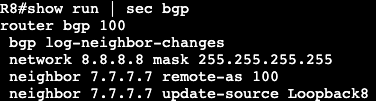
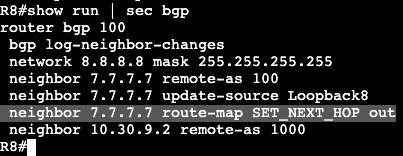
The BGP peering between R7 and R8 is not going through the tunnel. That is routable over the OSPF domain that’s setup for reachability. Below is R8’s BGP configuration:

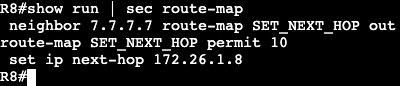
Now we’re going to setup a route-map that changes the next hop of advertisements between R8 and R7.

We’re setting up a route map that modifies the next hop to be the local GRE tunnel interface IP, and then advertising that via a route-map to our iBGP peer. The reason we’re doing this is for reachability between R9 and R10. Without this our local next-hop would be advertised which is not setup in the OSPF domain. As it shouldn’t, typically that would be out of our domain space. Or it is in our domain but we’re trying to minimize BGP peering. The opposite of the route map and BGP change is completed on R7’s side as well. The result is below:

9.9.9.9 (R9’s loopback) is now actually added into the RIB of R8 with a next hop of 172.26.1.7, the tunnel interface of R7.

MPLS:

  • MPLS is this same logic as GRE, but more flexible.
    • Arbitrary transport
    • Arbitrary payload
    • Extensible applications

Example Case:

  • Form MPLS tunnel from ingress to egress.
    • Typically IGP + LDP is used for this.
    • Could be BGP or RSVP (MPLS TE)
  • Peer BGP from ingress to egress
  • Recurse BGP next-hop to MPLS label.
  • What is the core’s data plane result?
    • Core label switches ingress PE to egress PE
    • Core does not need end-to-end information.

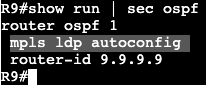
On the image above now we’re going to enable MPLS. First we’re removing the GRE tunnel though between R8 and R9 with ‘no int tunnel0’. After we’re going into the OSPF process on every router and enabling MPLS autoconfig with LDP.

After entered on all of the routers you can start to see these messages in the console that LDP neighbors are forming. The LDP neighbors will be the exact neighbors we already have in OSPF.

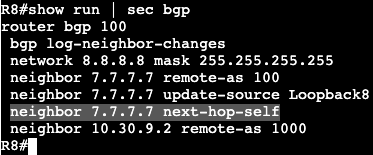
Now on our BGP configurations for R8 and R7, we’ll need to remove the route-map for next hop and do a normal ‘next-hop-self‘ on the neighbor statement like below.

There is now reachability again between R10 and R9’s loopbacks.

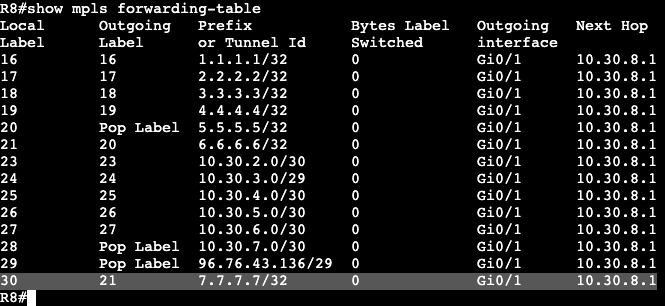
On R8 we can see in the MPLS forwarding table that it has reachability to R7

NOTES:

  • MPLS is advantageous because it allows us to not run BGP over all transit routers.
  • The BGP table is too large, this minimizes the table size.
  • Another form of tunneling, easier than doing VPN or GRE everywhere.